Pipeline reliability and security

Best Practices for Pipeline Reliability and Security
CI/CD pipelines are the heart of any modern DevOps setup. They keep your software delivery flowing smoothly, like a well-oiled engine. But even the best engines need regular maintenance and some safeguards to prevent failures. In the world of CI/CD, those safeguards are your reliability and security practices. A poorly designed pipeline can lead to all sorts of nasty surprises: deployment errors, security vulnerabilities, and a lot of lost sleep. We'll help you build and optimize rock-solid CI/CD workflows.
- Build robust CI/CD pipelines you can trust.
- Implement safeguards to protect your workflows.
- Compare GitHub Actions and Azure Pipelines.
Reliability: How to Build Pipelines You Can Trust
Reliable pipelines don't just happen. It takes careful planning and commitment to minimize risk and ensure consistent performance. Here are some of the things we’ve learned when it comes to setting up reliable pipelines.
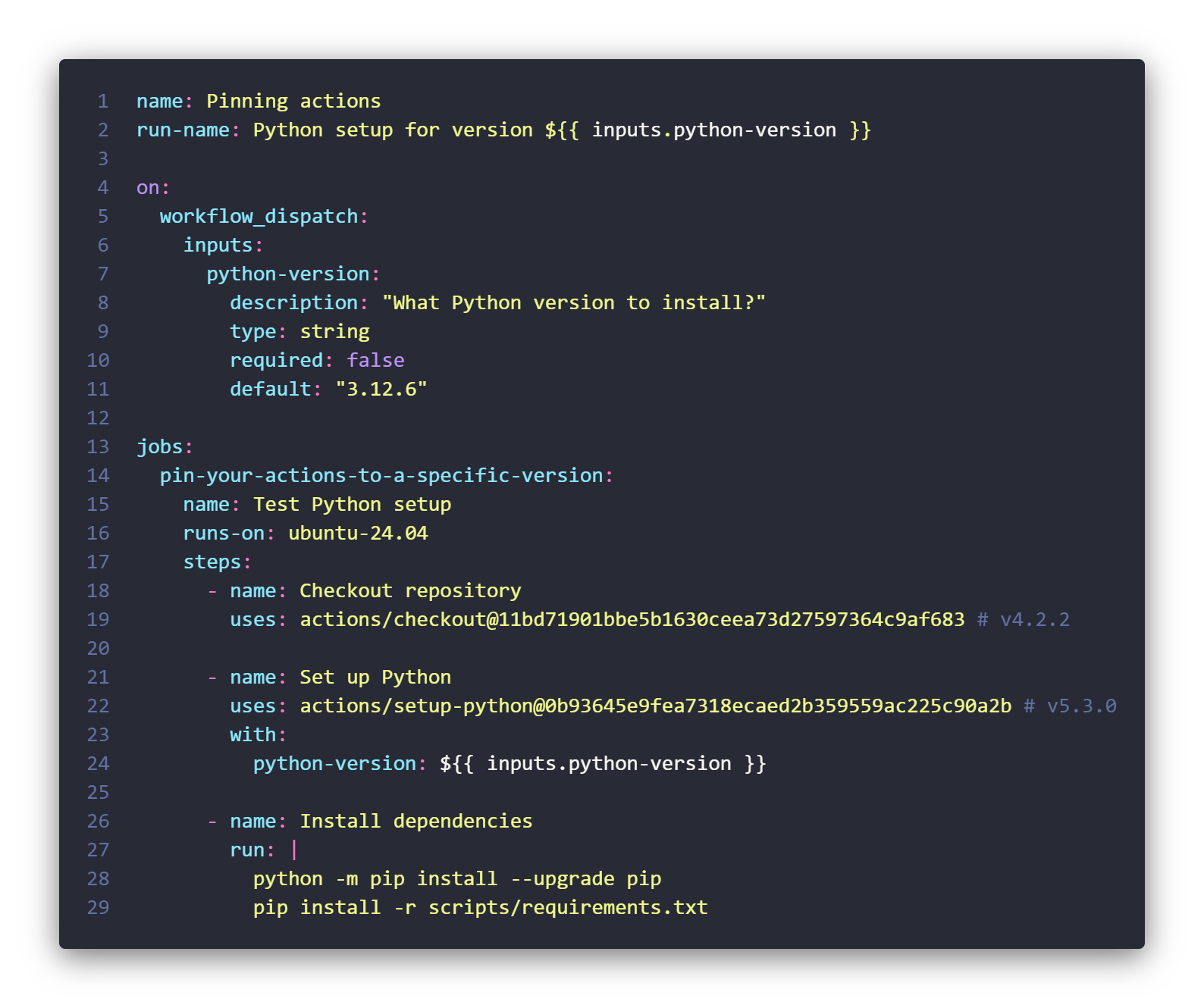
Pin your actions or steps
Use specific versions for agents/runners
When versioning, don’t (just) rely on main or latest – those are moving targets. Use fixed versions instead to guarantee that your pipeline uses the exact code you've tested and approved. For example, GitHub
Just like your actions and steps, you also need to specify the version of the runners (GitHub Actions) or agents (Azure Pipelines) that execute your pipelines. This means pinning your pipelines to use specific versions of the runner or agent image, similar to how you pin actions and steps to tags or commit SHAs. Specify the exact version you want to use. This seemingly small detail can prevent compatibility issues caused by updates to the underlying infrastructure.
Perform reviews
Besides versioning, code reviews also aren’t just for application code. Your pipelines deserve the same level of scrutiny. Require peer reviews and approvals for all pipeline changes. This extra set of eyes can catch potential errors, ensure consistency, and enforce your team’s best practices.
Authenticate without renewals
If you're using GitHub Actions, consider using GitHub Apps for authentication instead of Personal Access Tokens (PATs). Unlike PATs, GitHub Apps don't expire, saving you the hassle of constantly renewing tokens and preventing interruptions to your pipelines. Additionally, the tokens generated by GitHub Apps are less susceptible to leakage. Note that it's critical to securely manage the private key associated with your GitHub App, as a leaked private key can pose a significant risk.
Avoid push and pray by doing tests
For those mission-critical pipelines or custom-developed actions, think about adding unit tests. Yes, pipelines can have unit tests too! This extra layer of validation verifies that your workflows are working as intended, catching potential problems before they reach production. Besides pipelines, this gives you an extra safety net for any code or infrastructure managed within your CI/CD workflows.
Security: Safeguarding Your CI/CD Workflows
Your pipelines handle sensitive data and have access to your infrastructure, so keeping them secure is obviously in your best interest.
Trust but verify
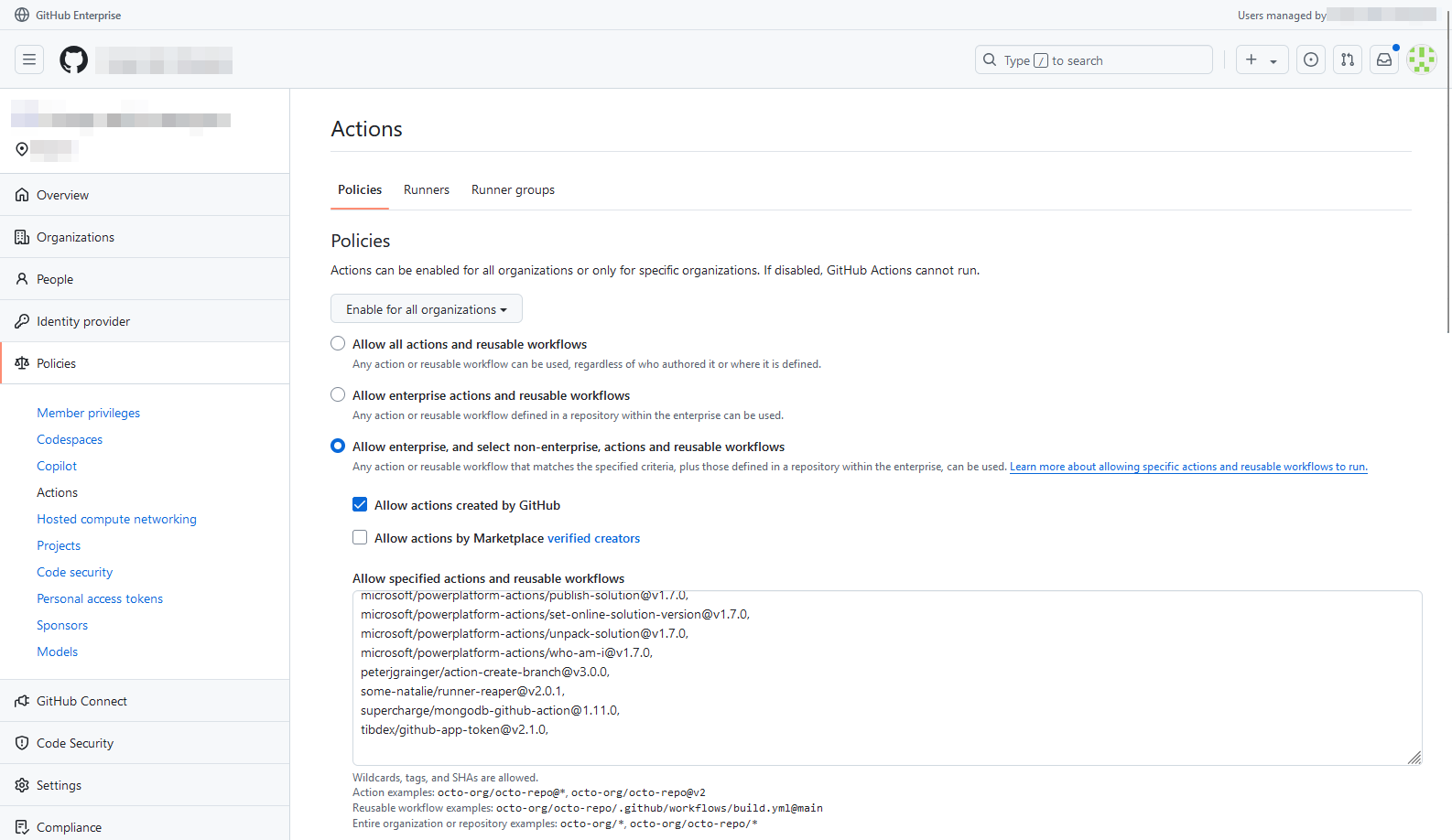
In GitHub Actions, be cautious about third-party actions. We suggest restricting usage to actions verified by GitHub, or even better, create an allow list of approved actions within your organization or enterprise. This minimizes the risk of running untrusted or potentially malicious code. If you’re a GitHub Enterprise user, here's where you can set this up:
Take into account the principle of least privilege
As always, keep the principle of least privilege in mind when it comes to pipeline permissions. Only grant the absolute minimum access required for your pipelines to function. Tools like the
Scan for secrets
Finally, secret scanning is your best friend for preventing sensitive information from leaking into your repositories. If you're using Azure Pipelines, integrate secret scanning into your pipelines to automatically detect and flag any secrets that might have accidentally slipped into your code. With GitHub Advanced Security (also available for Azure DevOps), you can go a step further: you can block commits that contain secrets from entering version control altogether, preventing exposure from the outset.
GitHub Actions vs. Azure Pipelines
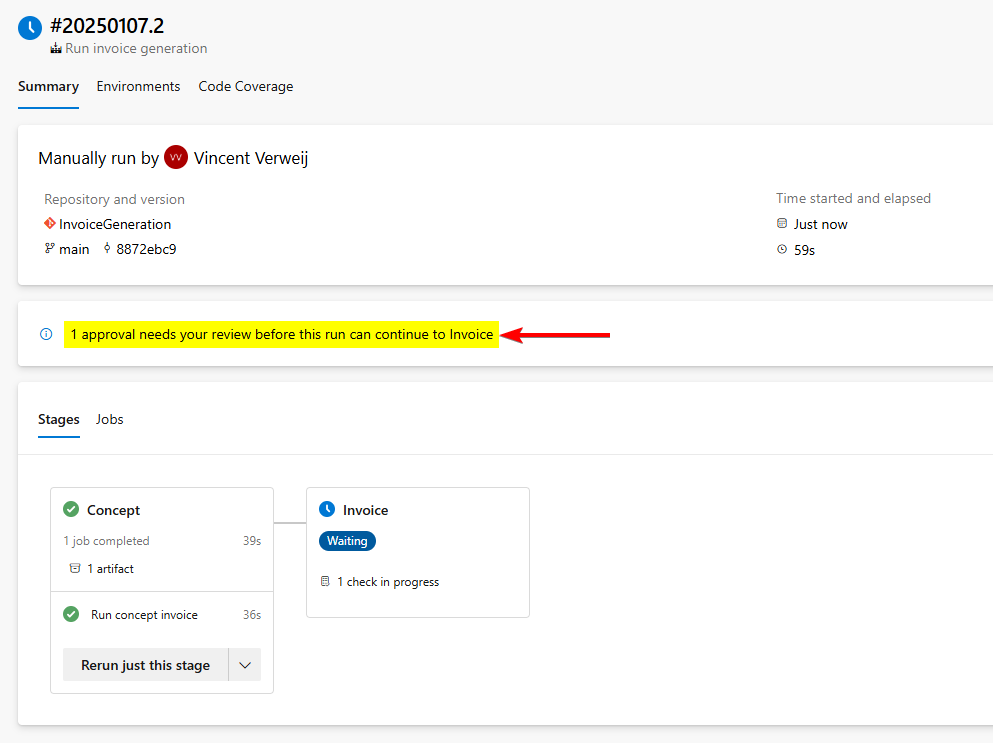
While most best practices apply across the board, GitHub Actions and Azure Pipelines have their own quirks and terminology, particularly in how they structure deployments. For example, while both platforms use the concept of environments (e.g., development, testing, production), they implement them differently. Azure Pipelines uses a higher-level concept called "stages" to group jobs, and environments are defined within these stages. In GitHub Actions, environments are typically defined at the job level, without the presence of explicit stages.
Whatever you call them, the key is to implement control gates or checks at each stage/environment. This ensures that deployments proceed only when specific conditions are met, such as passing tests or receiving approvals. It will help prevent untested or unapproved changes from reaching your users.
GitHub Actions tends to be more transparent with its actions, as they’re often open-source and publicly auditable. Azure DevOps extensions can be a bit more opaque, although many link to public GitHub repositories nowadays. Regardless of the platform, understanding what your actions or steps are actually doing is critical for maintaining security and reliability. Don't just run something!
Want a more in-depth comparison? We’ve covered the differences between GitHub and Azure DevOps in
Conclusion
Reliable and secure pipelines are essential for any successful DevOps operation. By implementing the practices we've discussed, you’ll build robust CI/CD workflows that you can trust.
In the
Looking to integrate GitHub Actions or Azure DevOps into your workflow?
Want to build CI/CD pipelines you can actually trust? We help teams implement the safeguards, approvals, and governance that keep workflows reliable and secure. Let's lock down your pipelines.
Want more secure and reliable pipelines?
Our team helps you harden your CI/CD pipelines and reduce the risk of supply chain attacks.
Want more? Read on!

Tips to boost efficiency and speed of your CI/CD pipelines
Slow pipelines are a productivity killer. They tie up resources, frustrate developers, and delay releases. And as we all know, every second counts in DevOps. In this blog post, we'll share some practical tips and techniques to optimize your CI/CD pipelines for maximum speed and efficiency.

Cloud-native security: how to secure your containers and pipelines?
Cloud-native apps are changing the IT game, offering scalability and agility like never before. However, just like any other application, they also require a variety of security measures to keep them secure. Let's give you some tips and tricks to bake security right into your CI/CD pipeline.

DevSecOps for AKS: buidling a secure pipeline in 3 phases
Security is no longer something you only think about after development, right before a release. Especially with containers and Kubernetes in cloud-native stacks, it’s become an integral part of the entire development process. We’ll teach you how to implement it the right way.