Azure web app scalability

How to Scale Web Apps on Microsoft Azure: A Comparison
As the load on your web app grows, the need for scaling will grow with it. This can be a daunting task, but Microsoft Azure offers multiple scaling options that are tailored for different workloads. Scaling features differ per compute solution. Let's compare the scalability of four compute solutions in Azure: App Service, Functions, Container Apps and Kubernetes Service. Each option has its own benefits, so read on to find out which one is right for you!
- Discover Azure's compute solutions for scaling your web apps.
- Compare App Service, Functions, Container Apps, and AKS.
- Choose the right scalability option for your specific workload.
Azure App Service
Azure App Service is the most popular compute solution we will look at. It is a Platform as a Service (PaaS) that enables you to build, deploy and scale web apps quickly and easily in the programming language of your choice without the need to manage infrastructure. Though Azure App Service offers auto-scaling and high availability, it isn’t the best fit for each workload. The image below illustrates the scaling behavior of App Service:
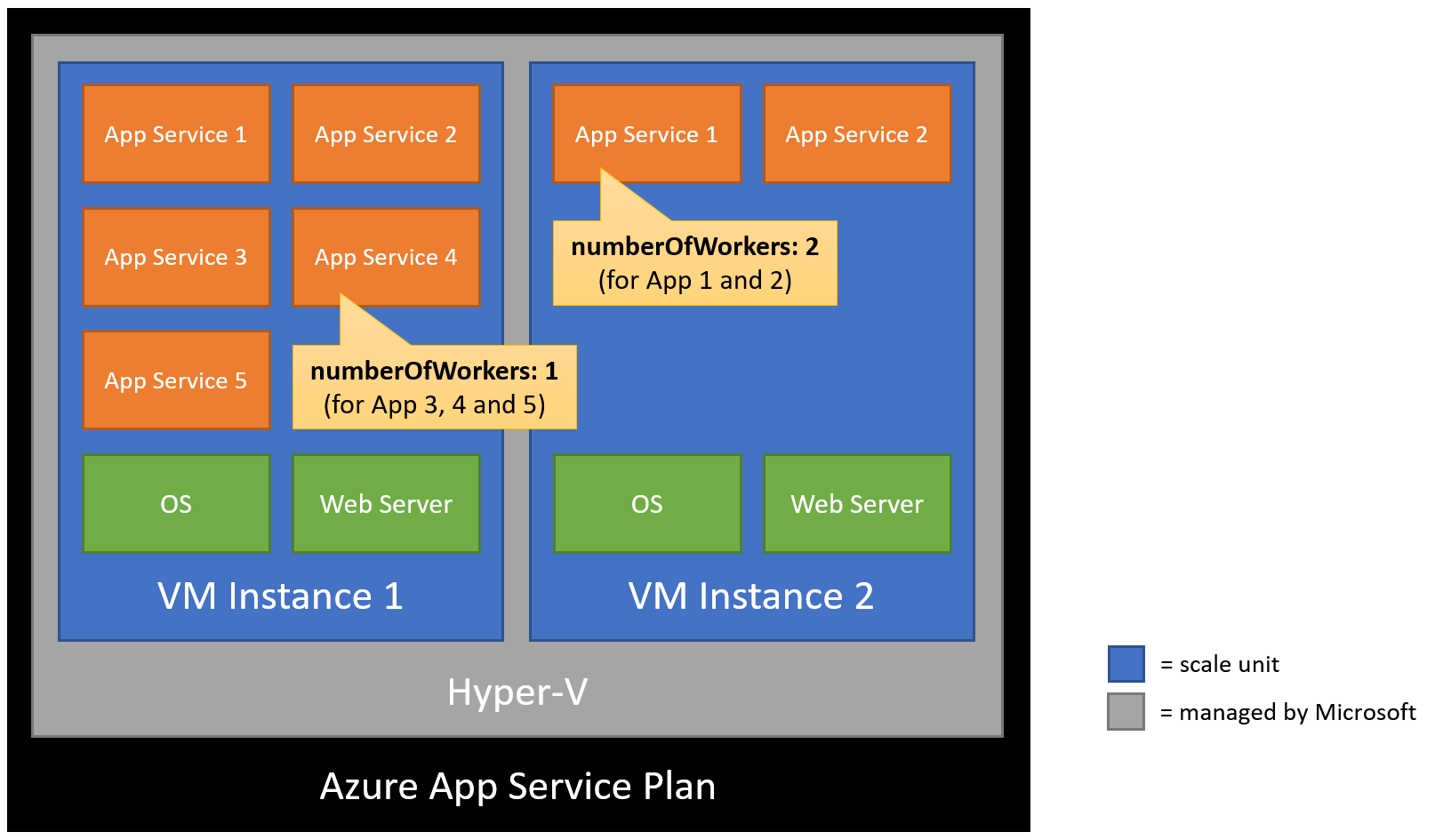
Enabling per-app scaling allows horizontal scaling in App Service and allows you to control the number of instances (or workers) per App Service. Each App Service instance requires a VM instance. If you have multiple App Services in your App Service Plan and only one App Service needs to scale-out, then two VM instances will be required. If a second App Service within that same App Service needs to scale-out, it benefits from the presence of that second VM instance and will also run there. To conclude, App Service scales well for always-on high-available web apps, but other workloads may run and scale more efficiently on other compute solutions.
Azure Functions
Azure Functions (FaaS) is a serverless compute service that enables developers to focus on the code that matters without having to worry about the infrastructure. Common use cases for Azure Functions are lightweight API's and small tasks in reaction to a schedule, message, event, or data stream. Because Microsoft provides and manages the infrastructure for you, scaling is also done automatically. However, controlling the scaling behavior is limited.
Azure Kubernetes Services
Azure Kubernetes Service (CaaS) is Azure's managed service for Kubernetes. Kubernetes is an open-source container orchestration platform that provides a way to automate the deployment, scaling, and management of containerized applications. AKS streamlines horizontal scaling, load balancing and self-healing. However, it's important to make sure that your team has sufficient experience with containers and Kubernetes before choosing AKS.
Azure Container Apps
Azure Container Apps (CPaaS) is a fully-managed serverless hosting service for containerized applications that abstracts the overhead of infrastructure management and orchestration. It offers the best of Kubernetes without the complexity of the infrastructure setup and management with a genuine serverless consumption pricing model. Azure Container Apps is a great choice for running microservices, APIs, event processing and long-running background jobs at scale. Predefined triggers make it easy to start scaling your application without writing a single line of code. For advanced scaling requirements, there is support for KEDA scale triggers.
Conclusion
To summarize, always keep scaling requirements in mind when selecting an Azure compute solution for your workload. This choice will affect the scaling ability of your workload, and also your bill. If you have an always-on web app, Azure App Service is the most popular choice. If you're looking for a serverless solution for a light-weight API or event processing, then Azure Functions is a good fit. If you have containerized applications or microservices with the requirement of full control over your infrastructure, then AKS is a good solution. And finally, if you want a serverless container solution, then Azure Container Apps is a good choice.
Of course, it is worth reiterating that the compute solution is just one part of the equation. Also, containerizing an application requires modularity in the application architecture to take full advantage of the flexible scaling of containers. If you’re looking for advice on designing and hosting high-available web apps or microservices, we can help.
Struggling to scale your web applications?
We help you pick the right scaling strategy for your Azure workloads. Get in touch.
Want more? Read on!

Background jobs in Azure: how do you run them?
We researched ways of running background jobs (or long-running operations) in a cloud-native way on Azure. Ready to learn more about our decision-making process and how you can get started yourself?

How to approach application reliability in Azure?
Downtime costs money, sluggish performance frustrates users, and unexpected errors create stress for IT teams. Many organizations turn to high-feature, high-cost monitoring platforms like Dynatrace. We'll teach you how to set up smart monitoring in Azure without expensive tools.