Background jobs on Azure

Background jobs in Azure: how should you approach it?
We recently built an application for one of our clients that accumulates their Office 365 workspaces (multiple SharePoint-sites and Teams) into a convenient overview. As part of this project, we researched ways of running background jobs (or long-running operations) in a cloud-native way on Azure. Ready to learn more about our decision-making process and how you can get started yourself?
- Compare Azure's options for background jobs
- Web Jobs vs. Functions vs. ACI & more
- Discover a serverless, containerized approach
The application we built is mainly responsible for lifecycle management and user management of the client’s workspaces. It provides users a personalized overview of their workspaces and the possibility to request different types of workspaces.
Additionally, the application unifies and centralizes the creation of SharePoint sites and Teams, monitors inactive workspaces and reminds users when archiving is recommended. Because users can still create workspaces outside of the application as well, the application’s database needed to synchronize with the client’s Office 365 environment regularly.
What are the possibilities for background jobs?
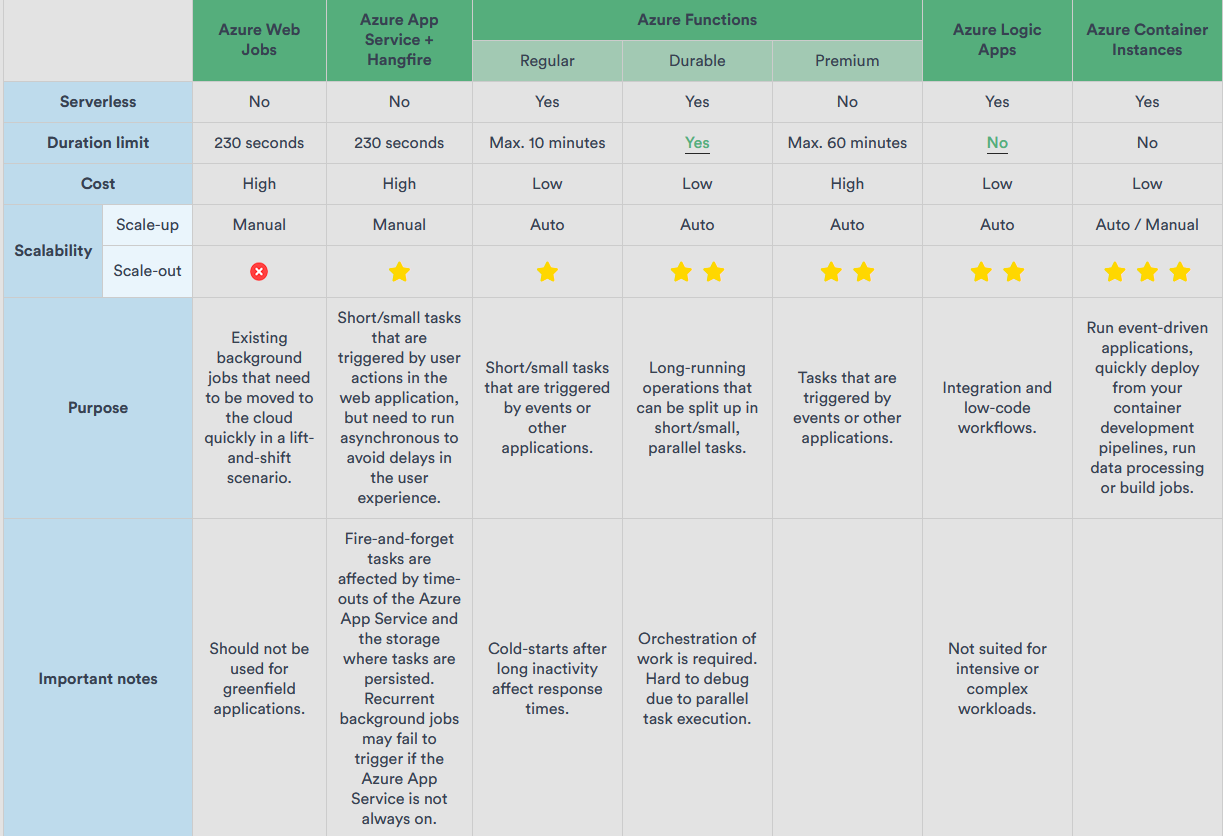
The table below summarizes our research. It sums up different possibilities in Azure and the elements that may influence your decision in designing the background job. Keep in mind that it is not exhaustive, and should therefore be treated as a starting point as opposed to a complete guide.
Note: we deliberately left out Azure Batch from this table, since it focuses on virtual machines instead of containers. Because our solution is serverless and cloud-native, Azure Batch was not a feasible choice.
Which option for background jobs did we choose?
We eventually decided on a .NET 6 C# console application, which we put into a Linux-based Docker container image. We uploaded that container to an Azure Container Registry, which allowed us to run instances of this console application in Azure Container Instances. Once the background job was running correctly inside the Azure Container Instance, we used an Azure Logic App with a recurrence trigger to start the Azure Container Group periodically.
By using a serverless model and a consumption-based plan, the background job is cheap to run compared to alternatives. Because we coded the application in .NET 6 C#, we can use it with all platforms and operating systems. The Azure Container Instance provides us with plenty of scaling possibilities, while avoiding dependencies on packages like Hangfire — an approach often used in fire-and-forget background jobs for .NET applications.
Ready to start building background jobs on Azure?
Our engineers can help you design and implement a reliable, scalable processing architecture.
Want more? Read on!

How can you scale web applications on Microsoft Azure?
As the load on your web app grows, the need for scaling will grow with it. But Microsoft Azure offers multiple scaling options that are tailored for different workloads. Each option has its own benefits and downsides. Ready to find the one that's perfect for you?

Choosing a container service: when should you go with AKS?
We'll list some scenarios we encountered where AKS shines when compared to some common alternatives like Azure Container Apps (ACA), Azure Container Instances or Azure Web Apps for Containers. And scenarios where it doesn't. Let's dive right in!