Cloud container scanning

Cloud container scanning: which tool is best?
As a DevOps engineer, one of the most important aspects of guiding a successful cloud migration journey is security. Ensuring the safety and reliability of your container images is vital to protecting your cloud-native applications from potential vulnerabilities. However, there are plenty of possible tools out there, so choosing the right one isn’t always easy. To help you decide, we’ve prepared a comprehensive comparison of four popular different container scanning tools: Grype, Trivy, Microsoft Defender for Containers, and Snyk. We’ll discuss what their main and additional features are, and which integration options they offer. Let’s get started!
- Compare Grype, Trivy, Defender & Snyk
- Evaluate key features & integrations
- Find out which tool is the right fit for you
Our contenders
Before we delve into the details of our comparison, let’s quickly introduce our contenders:
- Grype is a scanner that checks for vulnerabilities in the most popular Common Vulnerabilities and Exposures (CVE) databases. It is powered by Syft, a tool that generates a Software Bill of Materials (SBOM). Both tools are open source, developed by Anchore, and focus on container images and filesystems.
- Trivy is another security scanner that not only detects vulnerabilities, but also configuration issues. For example, it can verify how secrets and other sensitive information are handled in your setup. It is a completely open-source project, with source code hosted on GitHub.
- Microsoft Defender for Containers is a specific part of Microsoft Defender for Cloud that focuses on scanning containers. It is mainly used with cloud resources like the Azure Kubernetes Service (AKS), but it also has a preview available for Amazon Web Services (AWS) and Google Cloud Platform (GCP). It even offers on-premises support through Azure Arc.
- Snyk is a well-known security scanning tool that offers a container-specific solution with their Snyk Container product. It distinguishes itself from other tools by taking a developer-first approach. Besides identifying vulnerabilities, it will also guide developers on fixing these issues, and try to solve them itself.
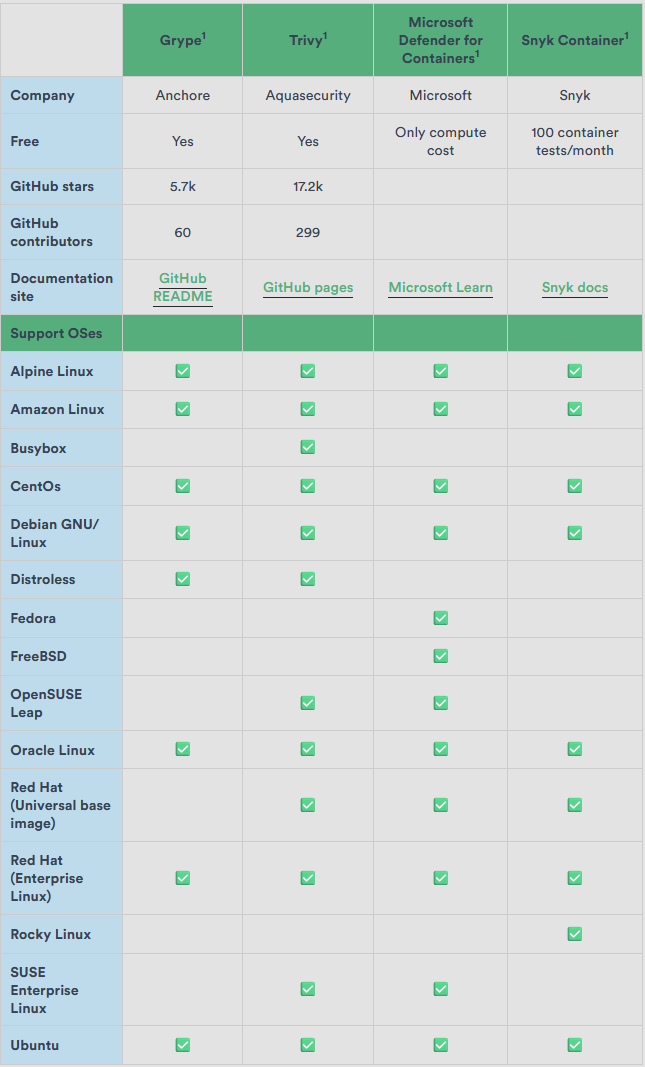
Additional features
Besides the key characteristics that we listed above, each tool also offers additional features. Let’s see what else Snyk Container, Grype, Trivy, and Microsoft Defender for Containers bring to the table.
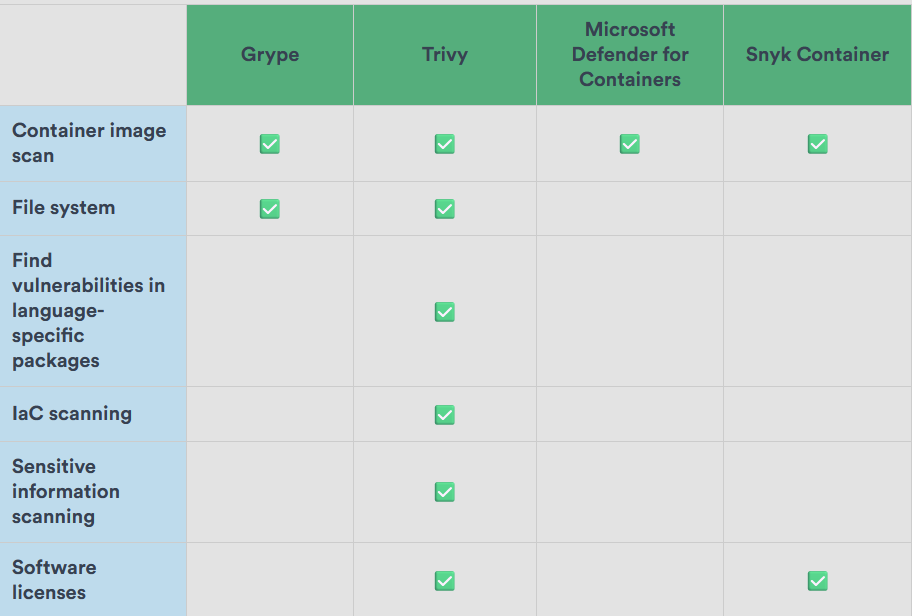
Trivy and Snyk Container stand out with their comprehensive feature sets. Microsoft Defender for Containers does not support as many features, but it’s worth pointing out that there are other flavors of Microsoft Defender that do, such as
Integrations
If there’s one thing that matters when deciding on which container scanning tool to use, it’s integrations. The more integrations a tool offers, the more your container security workflow will be streamlined.
- Command-line interface (CLI) tools can be used to investigate vulnerabilities locally.
- Source code management (SCM) can scan for vulnerabilities in Git repositories.
- Continuous integration (CI) can ensure security by breaking a build when vulnerabilities are found.
- Container registries can be integrated with to perform a scan on all its images.
- Kubernetes can be used to run scans on the workload that is running inside its containers.
Let's see how each tool stacks up in terms of integration options. The answer isn’t always a simple yes or no, so be sure to check our commentary below this table and keep in mind that new options are constantly being added.
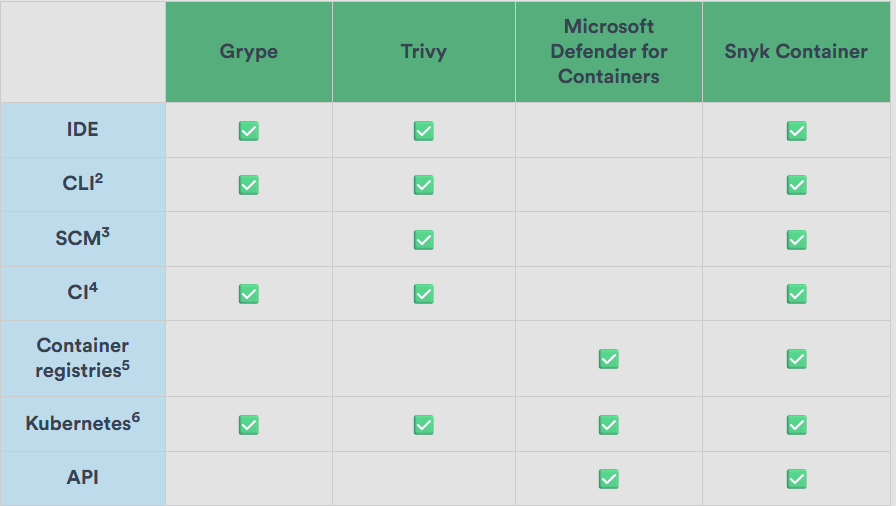
Grype offers an
Trivy also provides a dedicated
Microsoft Defender for Containers focuses on cloud resources, so it does not offer support for IDE, SCM or CI. However, it does offer support for running it on
Finally, Snyk Container shines with its broad range of integrations, all of which are documented on
Conclusion
After carefully considering each offering's features and integration options, we think that Trivy is an excellent choice for most, but not all companies. Its VS Code extension and CLI integration make it easy to work with, and its source code being hosted on GitHub makes it well-documented and transparent.
However, in the end it all depends on your specific use case, technology stack, budget, and personal preferences. Make sure to explore the documentation and offerings of each tool through the links we’ve provided, so you can make an adequately informed decision.
If you have any remaining questions, feel free to reach out for further insights and support in your cloud migration and container security endeavors. We specialize in the Azure ecosystem, but we’d be more than happy to help you out with any questions you may have.
Want to secure your container pipelines?
We help you integrate the right scanning tools into your CI/CD workflows. Get in touch.
Want more? Read on!

Cloud-native security: how to secure your containers and pipelines?
Cloud-native apps are changing the IT game, offering scalability and agility like never before. However, just like any other application, they also require a variety of security measures to keep them secure. Let's give you some tips and tricks to bake security right into your CI/CD pipeline.

Choosing a container service: when should you go with AKS?
We'll list some scenarios we encountered where AKS shines when compared to some common alternatives like Azure Container Apps (ACA), Azure Container Instances or Azure Web Apps for Containers. And scenarios where it doesn't. Let's dive right in!